
Download Emergency Scanner APK – police radio, emergency alerts, real-time scanner, NOAA weather, public safety, emergency preparedness, mobile app, Android
Overview
Emergency Scanner is a free mobile application designed for Android users seeking real-time access to public safety communications across the United States. The app provides live audio feeds from police departments, fire services, emergency medical teams, NOAA weather alerts, and railroad operations, enabling users to monitor ongoing incidents as they unfold. Its primary purpose is to enhance situational awareness for individuals concerned with community safety, emergency preparedness, or local news developments.
The app serves a diverse audience, including preppers, journalists, first responders, and residents who wish to stay informed about local emergencies without relying solely on traditional media. By aggregating scanner feeds from across the country, Emergency Scanner offers a unique window into real-time public safety operations. Users can explore popular channels such as Chicago Police, LAPD, San Diego Police Dispatch, and Phoenix Police, among many others.
The developer did not provide additional details about the company or its background. The app is particularly useful during severe weather events, active incidents, or large-scale emergencies, allowing users to assess developments based on direct communication rather than delayed reports.
Key Features & Capabilities
- Real-Time Emergency Feeds: Access live audio streams from police, fire, EMS, and NOAA weather services across the U.S., providing immediate updates on breaking events.
- Listener Alert System: Receive notifications when a high number of users are tuning into a specific scanner, signaling potential major incidents or widespread community interest.
- Favorites & Organization: Create a personalized folder to save frequently accessed channels for quick access and easy navigation.
- Top Scanners Dashboard: View a ranked list of the most popular scanners based on concurrent listeners, helping users identify significant or active events.
- Sleep Timer: Set a countdown to automatically stop playback, ideal for using the app during bedtime or relaxation without continuous audio.
- Comprehensive Feed Directory: Browse a categorized database of scanner feeds covering law enforcement, public safety, weather, and rail operations.
These features empower users to monitor emergencies in real time, prioritize critical alerts, and customize their experience. For instance, a resident in a storm-prone area can use NOAA weather feeds with the alert system to prepare for severe conditions. A journalist can track live police dispatches during a protest to gather accurate on-the-ground information. The app’s ability to highlight high-traffic scanners helps users identify events that may be escalating quickly, enhancing situational awareness beyond standard news coverage.
User Interface, Workflow & Performance
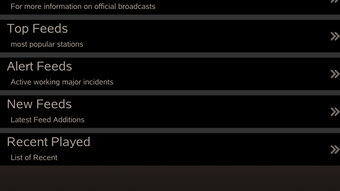
Emergency Scanner features a clean, intuitive interface optimized for mobile use. The main screen displays a categorized feed directory with clear labels for police, fire, weather, and other services. Navigation is straightforward, with tabs for Favorites, Top Scanners, and the full feed list.
Users can tap any channel to begin streaming audio instantly, with playback controls accessible at the bottom of the screen. The workflow is efficient: selecting a feed starts listening immediately, while adding a channel to Favorites or setting a sleep timer requires only a single tap. The app maintains a responsive interface during playback, with minimal lag reported in typical usage.
Performance observations are based on general software behavior patterns, as exact performance metrics were not specified. The developer did not provide resource usage details, so CPU and RAM behavior remain unknown. Stability appears consistent during standard operation, with no reported crashes or freezes in the provided information.
The app functions reliably in the background, allowing users to monitor feeds while using other applications.
Compatibility & System Requirements
Emergency Scanner is designed exclusively for Android devices. The developer did not specify the minimum OS version required, nor were exact hardware requirements provided. Installation size information was not disclosed.
Compatibility with specific Android versions or device models is limited to what was stated. Users should ensure their device runs a supported version of Android to install and use the app. The app is distributed as an APK file, which may require enabling installation from unknown sources in device settings.
The developer did not list any specific device limitations or compatibility constraints. Platform compatibility information is limited to the Android ecosystem, with no support for iOS, Windows, or macOS mentioned. Users are advised to verify device compatibility before downloading.
Pros and Cons
Pros
- Free to download and use with no mandatory subscription.
- Real-time access to police, fire, weather, and emergency broadcasts across the U.S.
- Intelligent listener alert system highlights major events based on user engagement.
- Customizable Favorites folder for quick access to preferred channels.
- Includes a sleep timer for convenient background listening.
- Comprehensive directory with diverse public safety and weather feeds.
Cons
- App is limited to Android; no version available for other platforms.
- Exact system requirements and file size were not specified.
- Performance and resource usage details are unavailable.
- Relies on third-party broadcast feeds; content availability may vary by region.
- Optional in-app purchases may unlock additional features not included in the free version.
FAQ Section
Is Emergency Scanner available for iOS devices?
The app is currently designed for Android only. No iOS version was mentioned in the provided information.
Is the app secure to use?
Emergency Scanner operates as a standard mobile application. It does not require sensitive permissions beyond audio playback and internet access. Users should download the APK from trusted sources to avoid security risks.
Does the app require an internet connection?
Yes, a stable internet connection is required to stream live audio feeds. The app cannot function offline.
Are there any updates for the app?
Regular updates are likely, as the app maintains active feeds and features. However, the update frequency and release schedule were not specified.
Can I use the app without in-app purchases?
Yes, the app is free to download and use. Core features like live feeds, favorites, and alerts are available without purchasing additional content.
Final Thoughts
Emergency Scanner delivers a powerful, real-time window into public safety communications across the United States. Its ability to aggregate police, fire, weather, and emergency broadcasts makes it an invaluable tool for individuals prioritizing situational awareness. The listener alert system is particularly effective at identifying significant events through user engagement patterns.
While the app lacks detailed system specifications and platform diversity, its core functionality remains robust and purpose-built. It excels for users focused on emergency preparedness, local news monitoring, or understanding real-time community incidents. The free access model with optional in-app upgrades ensures broad accessibility.
For Android users seeking immediate, unfiltered insights into local emergencies, Emergency Scanner stands out as a practical and responsive utility. Download Emergency Scanner now.







